



Download Mouse Off Road – Free Mouse Speed & Distance Tracker for Windows
Mouse Off Road is a lightweight, free utility software designed to measure the distance traveled and speed of your mouse cursor on Windows systems. Perfect for users who want to track their mouse movement in real time, this tool provides accurate data on cursor displacement, making it ideal for productivity analysis, ergonomic assessments, or simply satisfying curiosity. Despite being released in 2006, Mouse Off Road remains a surprisingly functional tool, especially for those seeking a no-frills, reliable mouse tracker without the bloat of modern software.
With support for older Windows versions including Windows 95, it’s a rare gem that continues to serve users across Asia, particularly in Thailand, India, and Indonesia. The program is completely free to download and use, with no ads or hidden costs. Whether you're a power user, a remote worker, or just tech-curious, Mouse Off Road offers a simple yet effective way to monitor your mouse activity.
Track Your Mouse Movement with Precision
Mouse Off Road delivers a unique and practical feature set tailored for users who want to understand how much their mouse moves during daily computer use. Unlike standard mouse tools that only focus on clicks or button customization, this software measures the actual distance traveled by your cursor across the screen and calculates the speed at which it moves. The data is displayed in real time, allowing users to monitor their mouse activity instantly. This can be especially helpful for individuals working long hours at a computer, as excessive mouse movement may contribute to repetitive strain injuries. By tracking cursor travel, users can assess their ergonomic habits and make informed adjustments to improve comfort and efficiency.
One of the standout features of Mouse Off Road is its minimal system footprint. The software runs quietly in the background without consuming significant CPU or RAM resources, ensuring it doesn’t interfere with other applications. It’s particularly useful for professionals who rely on multiple programs simultaneously.
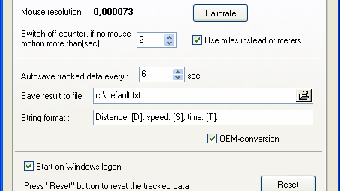
The interface is simple and intuitive—just launch the app, and it begins recording movement instantly. You can view total distance (in pixels or customizable units), average speed, and total time elapsed. These metrics are updated continuously, giving you a real-time snapshot of your mouse’s activity.
Whether you're a graphic designer, programmer, or remote worker, this data can help optimize your workflow and reduce unnecessary movements.
Another practical benefit is the ability to reset the counter at any time. This allows users to track movement during specific tasks—like editing a document or navigating a complex interface—providing valuable insights into task-specific mouse usage. For example, if you notice that your mouse travels 10,000 pixels during a 30-minute session, you might consider using keyboard shortcuts more often to reduce strain. The tool is also ideal for educational purposes, helping students and teachers understand digital interaction patterns. With no installation required and a simple setup, Mouse Off Road is a secure, free, and reliable way to gain visibility into your mouse behavior.
Easy Installation & Seamless Compatibility Across Windows Systems
One of the reasons Mouse Off Road has remained popular for over 15 years is its exceptional compatibility and straightforward installation process. The software is designed to run on a wide range of Windows operating systems, including legacy versions such as Windows 95, 98, ME, 2000, XP, and later versions. This broad support makes it an ideal choice for users still operating on older hardware or systems that can’t run modern applications. For those using Windows 10 or Windows 11, the program typically runs without issues, especially in compatibility mode, ensuring it remains accessible to a diverse user base.
To install Mouse Off Road, simply download the executable file from the official developer website. There’s no installer needed—just run the .exe file directly. This portable nature means you can even run it from a USB drive, making it perfect for use on shared or restricted computers. The software starts instantly with no lengthy setup wizard, and you’re ready to track your mouse movement within seconds. No admin rights are required, which enhances its usability in corporate or school environments where software installation is restricted.
Despite its age, Mouse Off Road is secure and free from malware, as confirmed by multiple user reports and community feedback. Since its release in 2006, it has been downloaded over 6,300 times, with consistent interest from users in Southeast Asia. The latest version, 2.17, was updated on November 27, 2006, and while no new features have been added since, the core functionality remains stable and effective. The program supports English, making it accessible to a global audience. For users who value simplicity, reliability, and compatibility, Mouse Off Road is a standout tool that continues to deliver value without the need for constant updates or system upgrades.
Pros & Cons: Is Mouse Off Road Right for You?
- Pros:
- Completely free to download and use
- Extremely lightweight and low on system resources
- Supports older Windows versions (Windows 95 and up)
- Portable – no installation required
- Real-time tracking of mouse distance and speed
- Simple, intuitive interface
- Secure and free from ads or malware
- Popular in Thailand, India, and Indonesia
- Cons:
- Last updated in 2006 – no recent feature improvements
- Outdated UI – minimalistic and not visually modern
- No support for Mac, Android, or iOS
- Limited customization options
- Only tracks mouse movement, not clicks or button actions
While Mouse Off Road may not appeal to users seeking flashy designs or advanced analytics, its strengths lie in its reliability and simplicity. For those who want a no-nonsense tool to measure mouse travel, it’s hard to beat. The lack of updates means it won’t integrate with newer Windows features, but it also means it won’t break due to compatibility issues. If you’re using an older machine or need a lightweight tracker for occasional use, this software is a solid choice.
Frequently Asked Questions (FAQ)
-
Is Mouse Off Road safe to download?
Yes, Mouse Off Road is safe to download. It is a free, open-source utility that has been used by thousands of users since 2006. No malware or ads have been reported. Always download from the official developer website to ensure authenticity.
-
Can I use Mouse Off Road on Windows 10 or Windows 11?
Yes, Mouse Off Road can run on Windows 10 and Windows 11. While it was last updated in 2006, many users report successful operation by running it in compatibility mode for Windows XP. No installation is required—just run the .exe file directly.
-
Does Mouse Off Road track mouse clicks or button presses?
No, Mouse Off Road only tracks the distance traveled and speed of the mouse cursor. It does not record clicks, button presses, or other mouse interactions. Its focus is purely on movement metrics.
-
Is there a Mac or mobile version available?
Currently, Mouse Off Road is only available for Windows. There are no official versions for Mac, Android, or iOS. However, users can try running it via compatibility layers like Wine on Mac, though results may vary.
-
How accurate is the distance measurement?
The distance measurement is highly accurate, based on pixel displacement across the screen. It calculates movement in real time and updates continuously. The data reflects actual cursor travel, making it reliable for ergonomic analysis or productivity tracking.
Final Verdict: A Timeless Tool for Mouse Tracking
Mouse Off Road may be over 15 years old, but it remains a surprisingly effective and secure tool for tracking mouse movement. Its lightweight design, compatibility with older systems, and zero cost make it a valuable addition for users who want to monitor their cursor activity without cluttering their system. While it lacks modern features and a contemporary interface, its core functionality is rock-solid and reliable.
For those in need of a free, no-installation mouse tracker that works on Windows 95 through Windows 11, Mouse Off Road is an excellent choice. Whether you're analyzing productivity, improving ergonomics, or just curious about how much your mouse moves, this software delivers exactly what it promises. With over 6,300 downloads and continued popularity in Asia, it’s clear that this tool still holds relevance.
Ready to track your mouse movements? Download Mouse Off Road today and experience a simple, secure, and free solution for Windows users.







